How do I check the status of my invoices?
You can check the status of your invoices online to find out if they:
- Have been received by ReturnToWorkSA
- Are valid or not
- Have been paid
- Have not been paid
- Are pending payment.
Go to invoice upload (bulk) and perform a search for the relevant time period.
- Click on the ‘Invoice upload (bulk)’ button on the home page OR go to Invoices / Invoices upload (bulk) in the top menu
- Enter the ‘Date uploaded from’
- Select the ‘File upload status’ (All, Passed or Failed)
- Click ‘Search’.
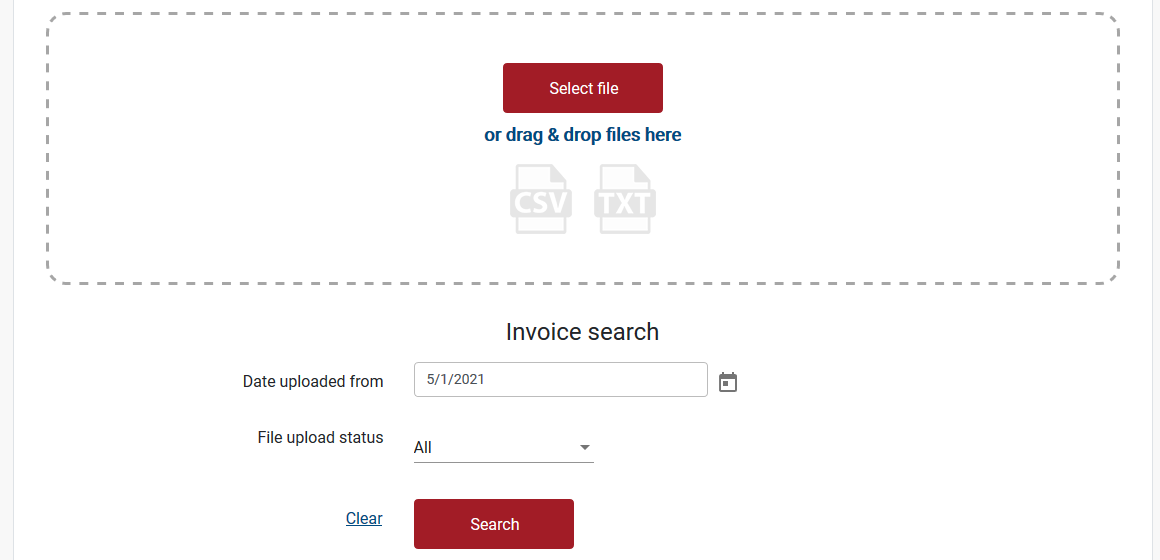
- The results will be displayed in a table.
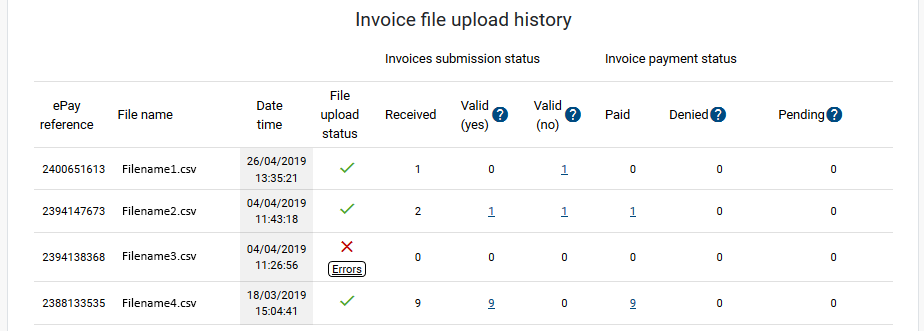
What do the columns mean?
File upload status
- Errors in files will be indicated in the ‘File upload status’ column.
- Click on the ’Errors' button under the red cross to display and print details about the error.
- A possible cause of errors may be the contents of your file. Please check your file meets the File format requirements.
- If your file has errors, they will need to be fixed and the file uploaded again.
Received
- Indicates the number of invoices received in the invoice upload.
Valid (yes) / Valid (no)
- Indicate how many of the invoices were accepted for processing or not.
- To view the details, click the numbers in each column
Paid
- Indicates invoices that have been paid.
- To view the details, click the numbers in the column
Denied
- Indicates invoices that were reviewed but the payment rejected by ReturnToWorkSA or our claims agents.
- To view the details, click the numbers in the column
Pending
- Indicates any invoices that are still being processed.
Still need help?
If you require assistance or have any feedback please contact us.
Call us on 13 18 55 between 8:30am - 5:00pm Monday to Friday or email info@rtwsa.com.