Can I change my password?
You can change your password when logged in to online services.
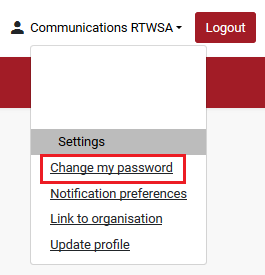
- If you are on ‘My home page’, click the ‘Change my password’ button OR click on the down arrow next to your name at the top right of the screen.
- Click on ‘Settings’.
- Click ‘Change my password’.
- Enter your current password.
- Enter your new password.
- Confirm your new password.
- Click ‘Submit’.
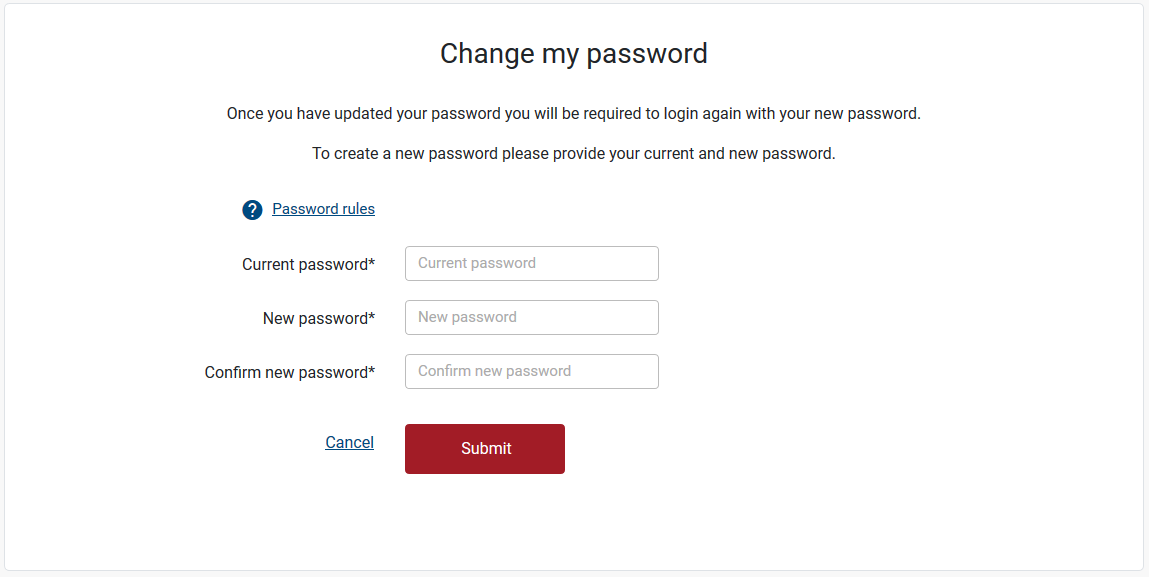
Note: Once you have updated your password you will be required to login again with your new password.
Still need help?
If you require assistance or have any feedback please contact us.
Call us on 13 18 55 between 8:30am - 5:00pm Monday to Friday or email info@rtwsa.com.